

Hi,
thanks again for using my free SERP Snippet Extractor plugin. The extension just received a major upgrade! Check the latest changes below!
By the way: Do you know my free Chrome extension GSC Helper to enhance Google Search Console?! It’s a must-have!
Let’s see what the latest update brought to you!
Version 3.0 – released 22.09.2026
🚀 Major upgrade – SERP Snippet Extractor is no longer just a one-click copy tool.
It still extracts Google results in one click. Version 3.0 turns those extracts into (an optional) local rank tracking and snippet analysis – keywords, domains, AI Overviews, overlap, and a Google-style snippet editor. All data stays in your browser. Still free. Decide if a click on the extension logo stores the data in your clipboard, or saves a .csv or .xlsx file.
Please do me a favor: Did you already ⭐⭐⭐⭐⭐ rate the plugin? No?! Here you go:
Chrome
Local rank tracking (Auto-Capture)
Save Google result pages as snapshots on your machine – no rank-tracker account, no cloud.
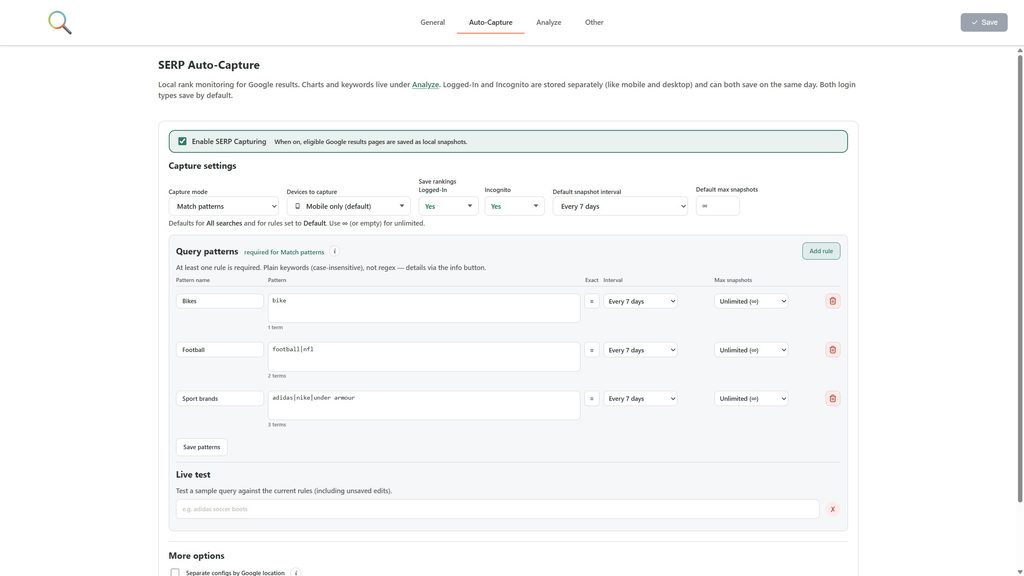
- Turn on SERP Capturing to store eligible searches automatically
- Match patterns (keywords with
|,AND,NOT) or capture all searches - Track mobile, desktop, or both – each device is stored separately
- Store Logged-In and Incognito rankings as separate histories (both can save on the same day)
- Set a snapshot interval (daily, 7 / 14 / 28 days, or custom) and a max number of copies per query
- Optionally split tracking by Google location (e.g. Germany vs. United States)
- Track a query instantly from the SERP toast or the right-click menu: Track this query
Mark important queries as priority, then refresh overdue keywords one by one – including in a private window for cleaner rankings.
Analyze your SERP history
Analyze is the new workspace for everything you captured. Shared filters cover pattern, device, login, location, and time period. Export all downloads every table as one XLSX workbook.
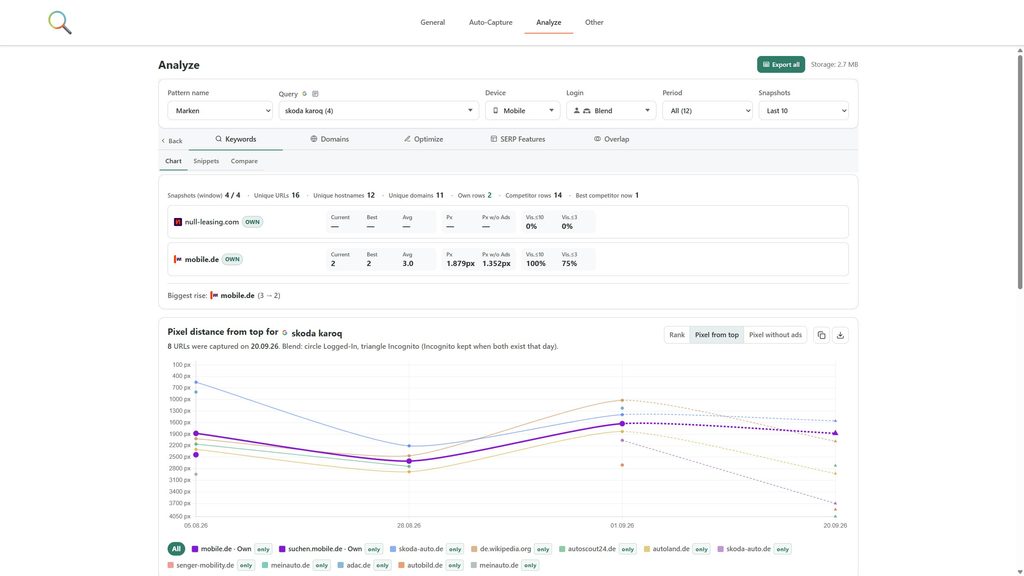
Five views:
- Keywords – library of tracked queries, charts, ranking tables, snippet history, snapshot compare
- Domains – who ranks across your keyword set (Own vs. Competitors)
- Optimize – rewrite title and description for your own URLs
- SERP Features – how often AI Overview, ads, videos, local packs, … appear
- Overlap – how similar two SERPs are by exact URL
Keywords: charts, snippets, compare
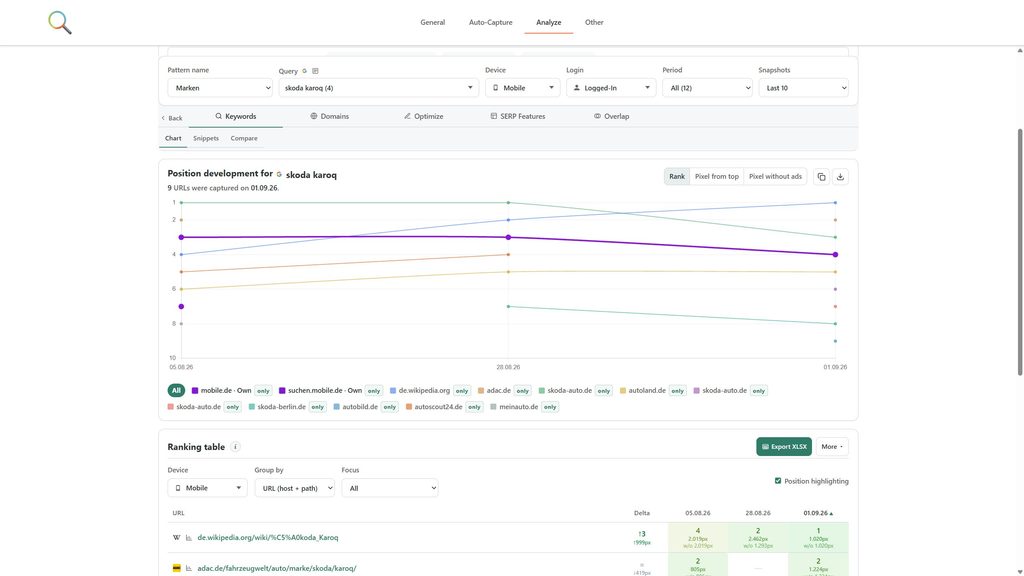
Click a query to drill in.
- Position development chart – switch between organic rank, pixel distance from the top, and pixel distance without ads
- Ranking table – organic URLs over time, Own sites marked, Focus on Own or Competitors
- Snippet changes – title and description history for a domain; fetch the live page title, H1 and meta description and compare them to what Google showed
- Compare snapshots – two dates side by side, with rises, drops, and new/lost URLs
- SERP preview – a Google-style reconstruction of the saved page (hide ads, export PNG, step through dates)
The keyword library shows SERP features on the latest snapshot, or Google’s search types (AI Mode, Images, News, …). Filter by feature, export the archive as XLSX/CSV/JSON, or download a ZIP of preview PNGs. Backup and import keep history portable.
Domains & competitors
Under General → Tracked websites, list your sites as Own or Competitor. Own sites count as yours in Analyze; competitors power Focus and “us vs them” deltas. Optionally draw a colored outline around matching organic results on Google.
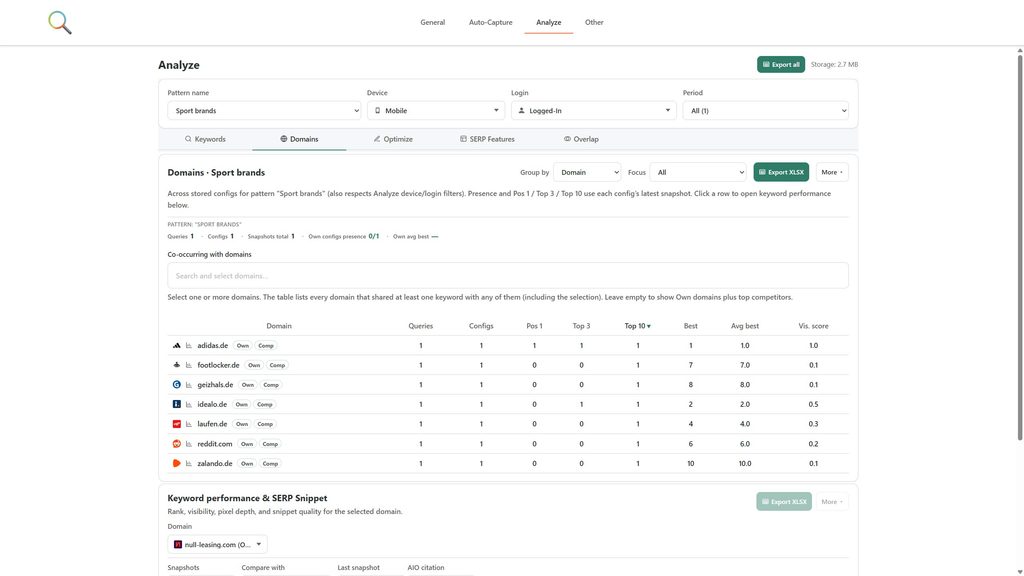
Domains then shows:
- Presence across all queries (group by domain or hostname)
- Keyword performance & SERP snippet for a selected site: rank, visibility, pixel depth, truncated titles/descriptions, sitelinks, images, rich results
- A snippet opportunity score so weak snippets surface first
On Google itself
The live results page now has an action panel (the SERP toast):
- Track, save snapshot, copy, or download (XLSX or CSV)
- Toggle mobile SERP view
- Cycle Own-site outlines: All / Own only / Off
- See whether the window is Logged-In or Incognito
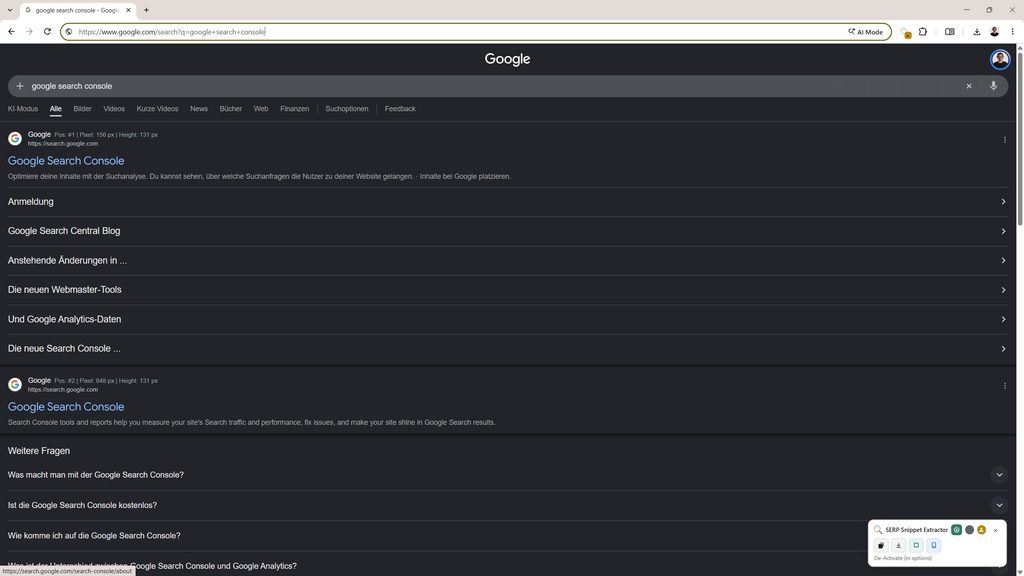
Optionally show organic rank, pixel position, and snippet height next to the sitename. Toolbar click can copy results or download a file. The right-click menu offers the same actions.
Optimize snippets
This is the feature the plugin was named for – now built in.
- Pick an Own URL that ranks in your captured SERPs
- Edit title and description with character and pixel-width meters (Google’s font, not just character counts)
- See query coverage: which tracked keywords the draft would still match
- Load the most common SERP snippet, a specific snapshot, or fetch title and meta from the live webpage
- Save drafts locally; download one URL or every saved optimization as XLSX
SERP features & AI Overview
- Detect and store AI Overview, ads (top / mid / bottom), Shopping / Vehicle Ads, product grids, news, local / maps, images, and videos
- Optionally save the AI Overview answer in the description field
- Export AI Overview sources (cited URLs) as XLSX or CSV
- Chart feature frequency over time: share of captured SERPs that included each block
SERP overlap
Compare two keywords by exact ranking URL.
- SERP Overlap (unweighted shared URLs) and Relevance (shared URLs weighted by rank)
- A recommendation for whether the queries belong together
- Query B defaults to the closest wording match
- Export similarity builds a batch report for all filtered queries – best partner plus mid/high overlap pairs – without picking A/B first
Richer extraction & exports
One-click extract is still there – just with more to paste.
- Organic position and overall position (ads and features included)
- Pixel distance from the top and pixel distance without ads
- Title / description character counts, pixel widths, and truncated flags
- Sitelinks, rich-result text, image layout (side / gallery), custom favicon
- Device, Incognito, location, search tabs, date and time
- Choose which columns appear; EU or US date format; optional header row
- Strip Google’s
srsltidtracking parameter from ranking URLs
Everything stays on your device. Favicon cache, file downloads, and live page compare only run after you grant the matching optional permission.
Version 2.5.2 – released 31.03.2026
- Google Vehicle Ads are now detected and extracted as a separate SERP feature
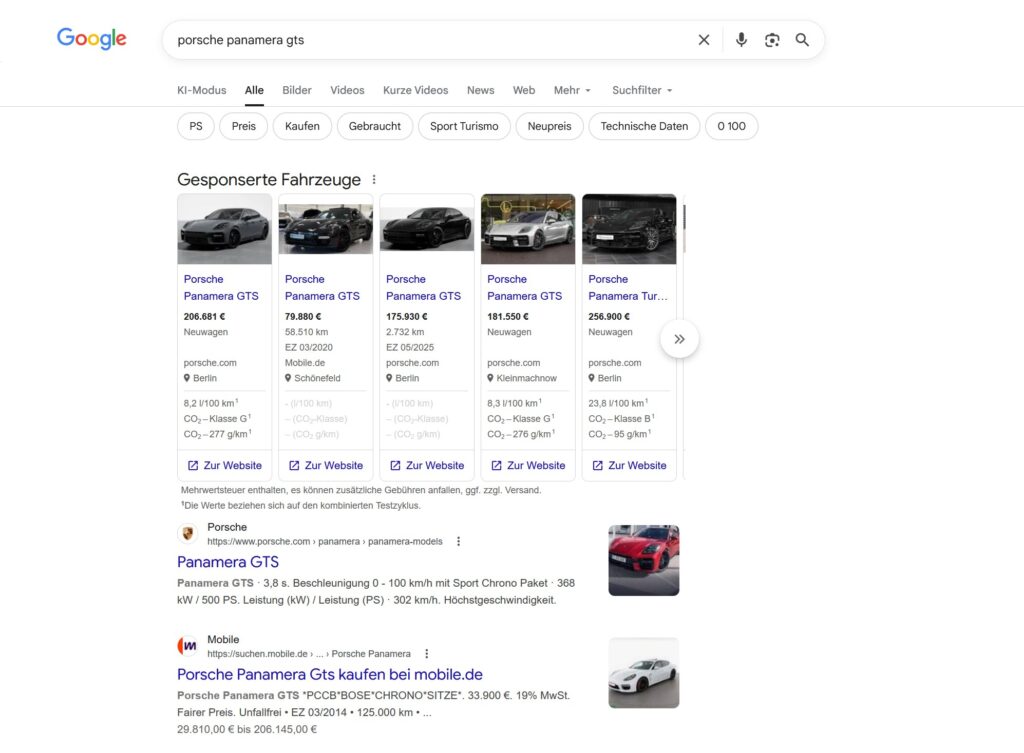
- Improved SERP parsing to detect more rich results
- Updated the options menu
Version 2.5.(1) – released 19.02.2025
🚀 Major Update – A Better, More Powerful SERP Snippet Extractor!
- 🎉 Complete Extension Rebuild – Enhanced to capture all SERP elements more accurately than ever.
- 📱 Improved Mobile SERP Extraction – Now fully supports all different ways to view mobile SERPs on desktop.
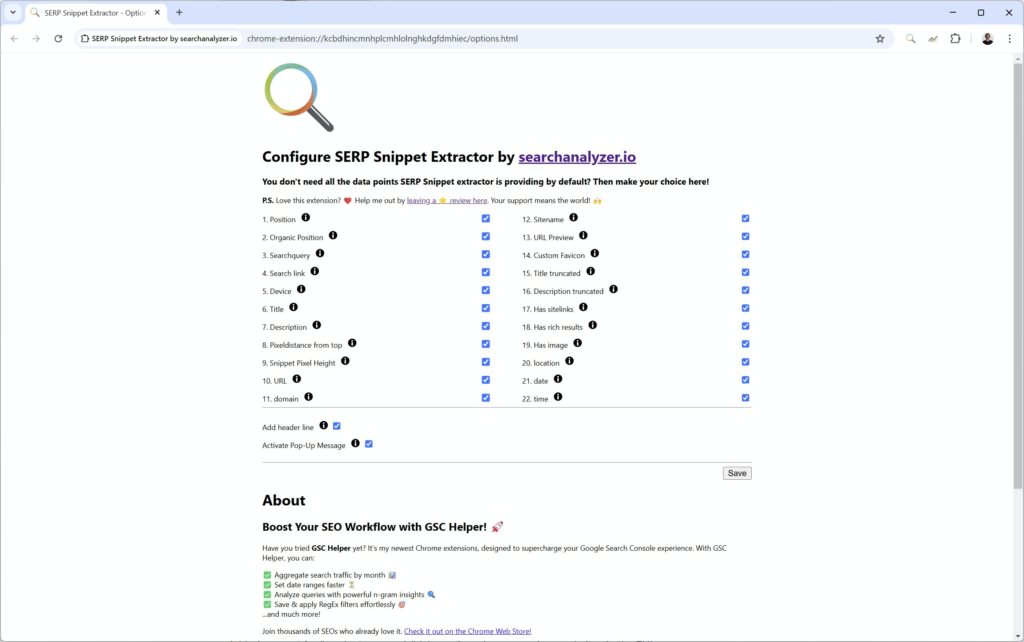
- ⚙️ New Options Menu – Choose exactly which data points you want to extract in the new options‘ menu. Reach the options‘ menu via right-mouse button click on the extension logo.
- 🔄 Branding Update – Now proudly part of searchanalyzer.io (formerly getindexed.io).
Enjoy the improvements, and as always, let me know if you have any feedback! 😊
Please do me a favor: Did you already ⭐⭐⭐⭐⭐ rate the plugin? No?! Here you go: Chrome | Firefox
Version 2.4 – released 03.06.2024
- Fixed an issue with desktop snippets, that affected some users. Now it should be working again.
Version 2.3 – released 14.04.2024
- Fixed an issue with mobile SERPs not being extracted
- Added support for „product carousels“ (shown for price comparison websites in the EU)
- Improved image detection in SERP snippets
- Fixed site name extraction on Desktop SERPs
- Improved flagging for SERP features
Version 2.2 – released 20.09.2023
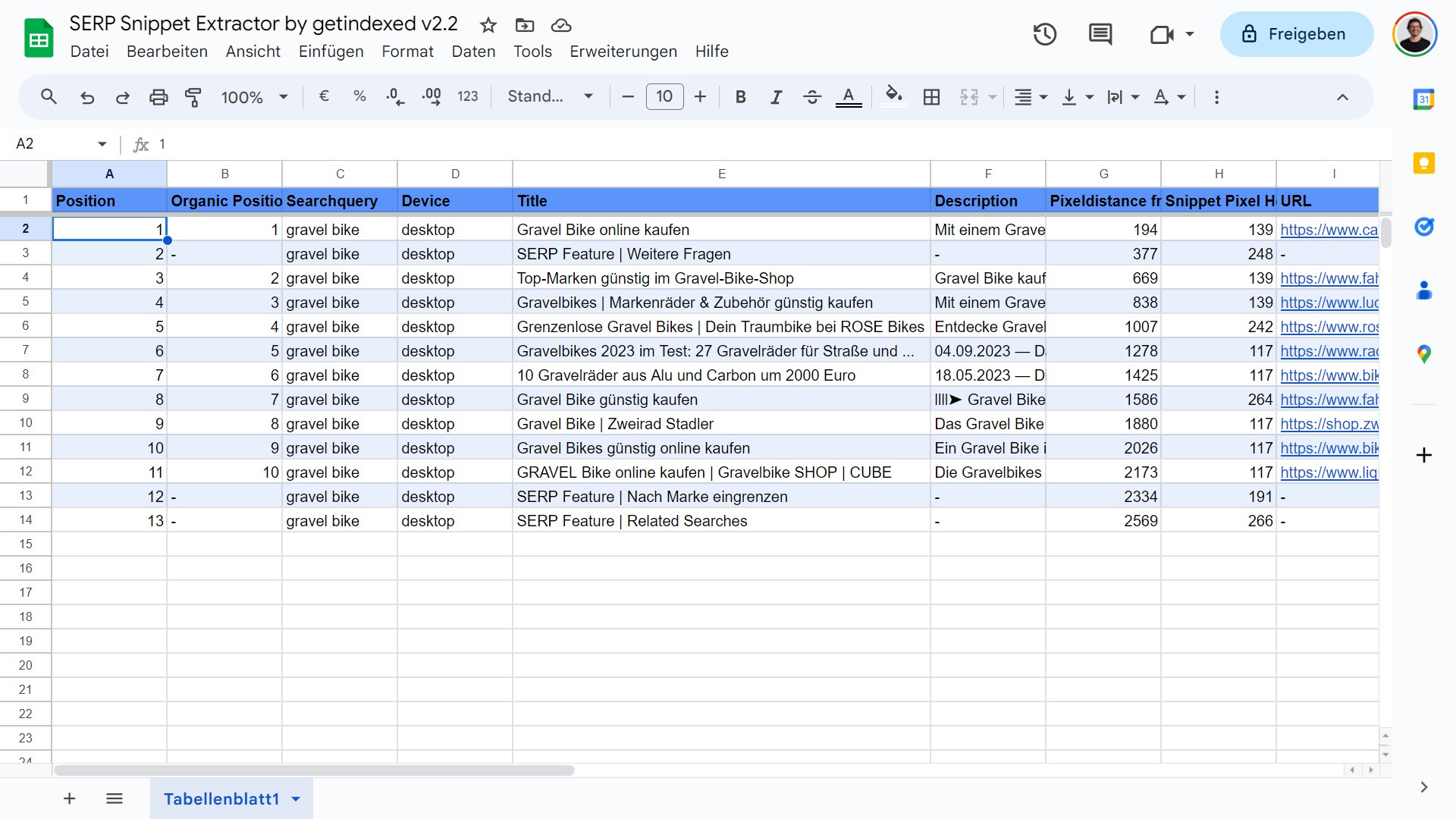
- Plugin now extracts all SERP element
- Position split between „organic position“ and „position“
Version 2.1 – released 26.06.2023
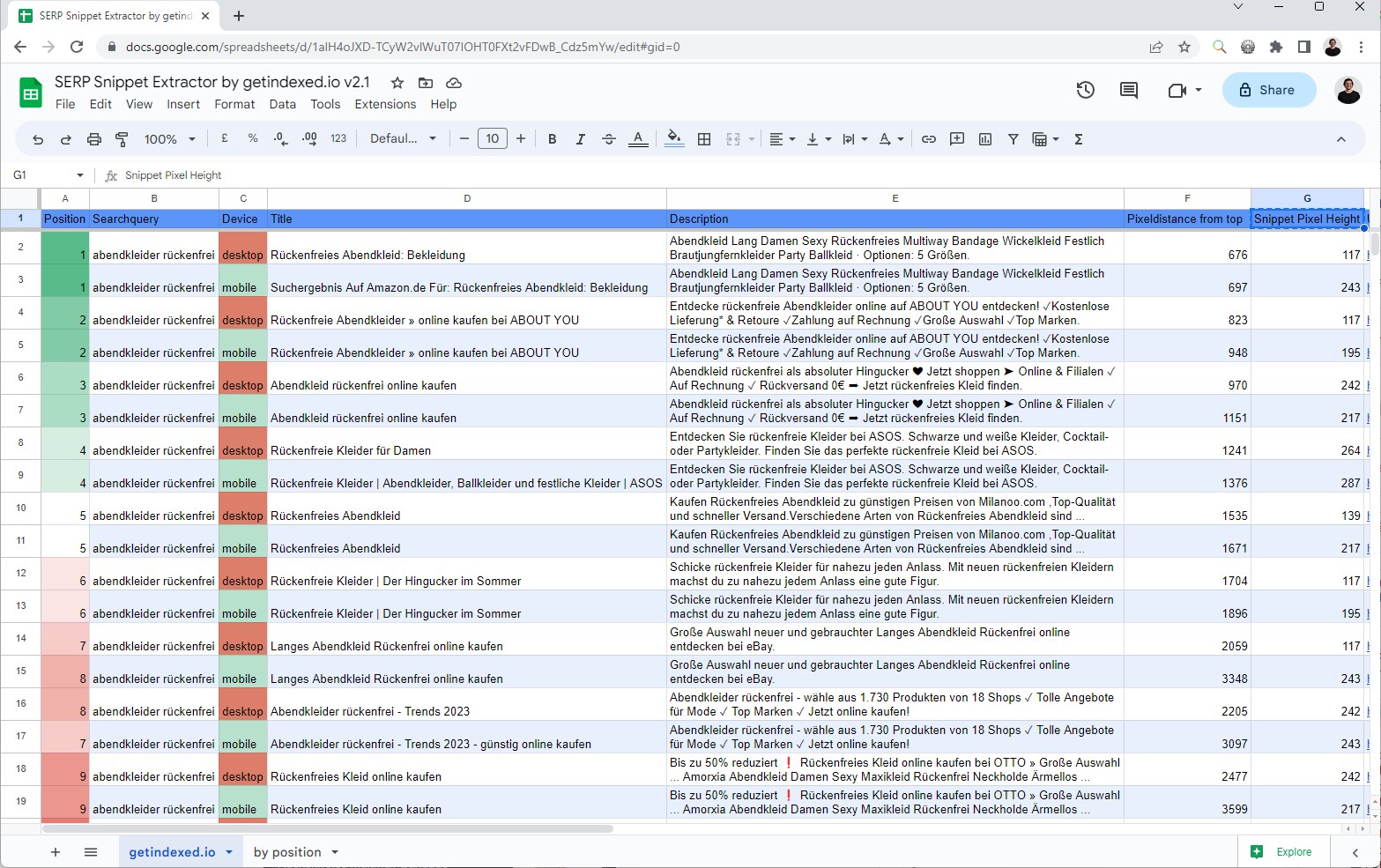
- Added Pixeldistance as a new metric. See how far away from the top a ranking is.
- Added „Snippet Pixel Height“ to show the dimension of a ranking
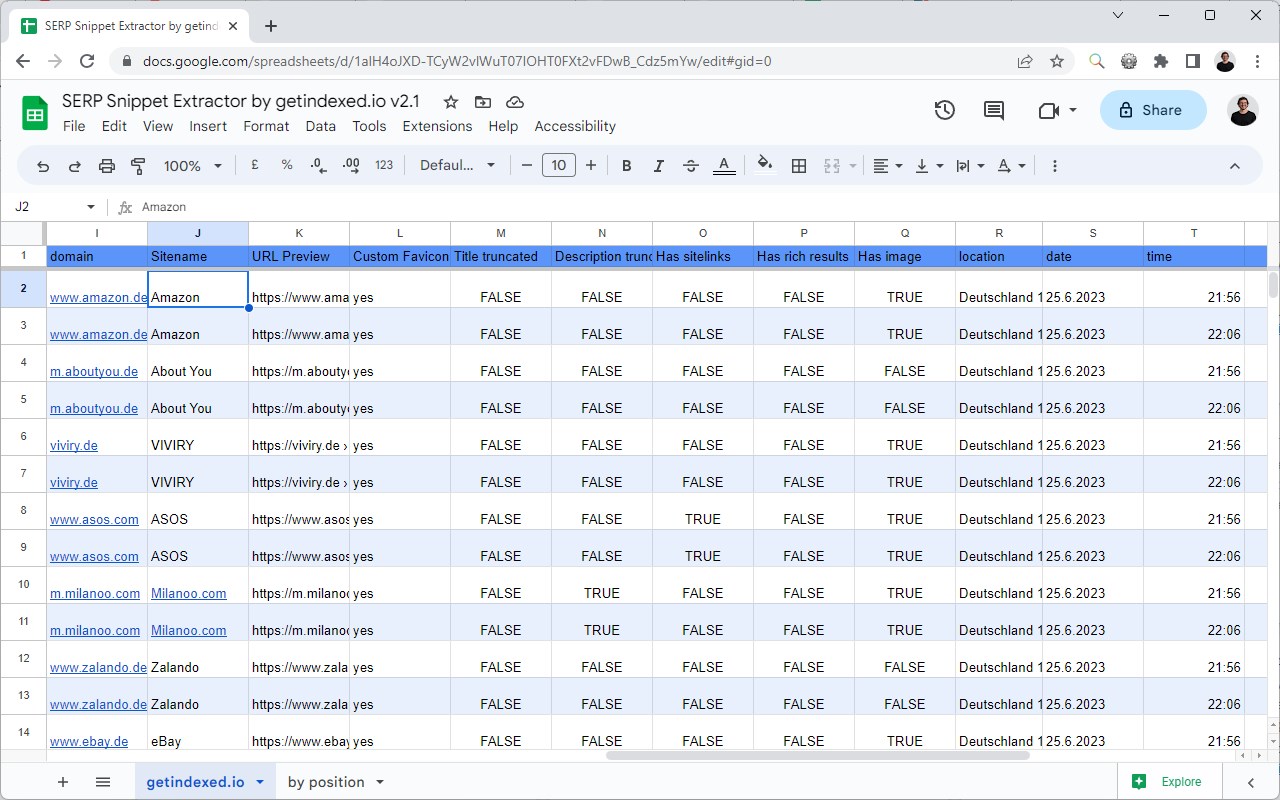
- Added sitename and URL preview to the export
Version 2.0 – released 18.04.2023
- All new =) We now extract more data points and added mobile support!
- Plugin renamed to „SERP Snippet Extractor“
Version 1.0.4.5 – released 02.09.2022
- New version after a SERP layout update by Google
Version 1.0.4.4 – released 19.07.2022
- New version after a SERP layout update by Google
Version 1.0.4.3 – released 18.05.2022
- Added „local directory extraction“ (shown above maps results in Europe)
Version 1.0.4.2 – released 18.02.2022
- We now also extract date and „result count“ information shown before a snippet
- Two new columns are added, indicating if a snippet is either too long in title or description
Version 1.0.4 – released 29.01.2022
- Re-worked the plugin to improve extraction success rate
- Lately, almost no results were extracted due to SERP design changes by Google
Version 1.0.3.2 – released 14.12.2021
- Some rich results (e.g. review or price markup) were not extracted properly
Version 1.0.3.1 – released 29.11.2021
- Added the current date as an additional column, e.g. for SERP history
- PDF results are now also extracted
Version 1.0.3 – released 18.09.2021
- A difference in the SERP layouts resulted in empty results for some languages. This is now fixed
Version 1.0 – released 26.08.2021
- Initial release of the plugin for Chrome and Firefox
If you have some feedback to share, send a mail to plugin@stephan-czysch.de or use the comment section below.
